![cc5404e7b75e6d484a23b7d9f19a2774.png]](https://support.arworkflow.com/hs-fs/hubfs/cc5404e7b75e6d484a23b7d9f19a2774.png?height=50&name=cc5404e7b75e6d484a23b7d9f19a2774.png)
When assigning a workflow to a customer in AR Workflow, the system now automatically checks whether the customer has the contact information and business configuration needed to successfully receive the workflow's actions. If any issues are detected, you will be notified before the assignment is confirmed — giving your team the opportunity to review and resolve them upfront.
How It Works
When you assign a workflow — AR Workflow runs a pre-assignment validation check. This check reviews the customer's contact details and your business's email and SMS setup to ensure everything is in place for the workflow to run as expected.
If any issues are found, a confirmation popup will appear displaying the affected customers and contacts along with details about what information is missing. You can review the warnings and then choose how to proceed.
The "Missing Contact Information" Popup
If the validation check detects an issue, a Missing Contact Information popup will appear before the workflow is assigned. This popup shows you exactly which customers or contacts are affected and what is missing — such as an email address, phone number, or business configuration setting.
From this popup you have two options. You can review the information and proceed with the assignment anyway, understanding that the workflow may not be able to complete certain actions for the affected customers. Or you can cancel the assignment by going back, update the missing information, and reassign once everything is in place.
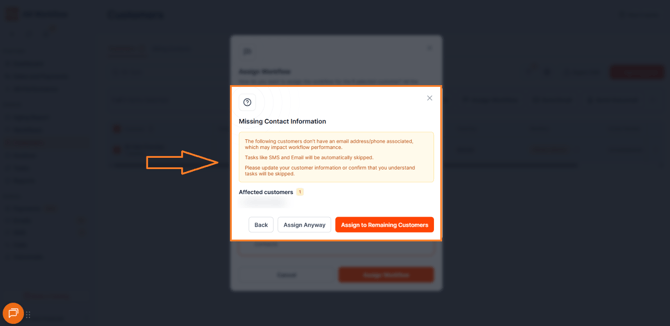
Assign to Remaining CustomersButton
A Assign to Remaining Customers option is also available during assignments. This allows you to automatically exclude any customers with missing or unsupported contact information and proceed with assigning the workflow only to the customers who are fully set up and ready to receive it — without needing to manually deselect affected customers one by one.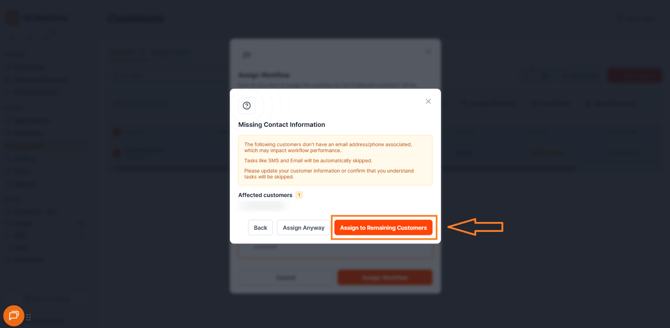
What Gets Validated
The pre-assignment validation checks for the following:
Customer contact details — Whether the customer or their associated contacts have the required email address or phone number needed for the workflow's actions.
Business email and SMS configuration — Whether your business account is properly configured to send emails and SMS messages through AR Workflow.
Why This Matters
Assigning a workflow to a customer with missing contact information means certain actions — like sending an email or SMS — will silently fail. The workflow will run, but the customer won't receive the communication. This validation check surfaces those issues before assignment so your team can fix them proactively, ensuring every workflow runs as intended and no customer falls through the cracks due to a configuration gap.
Need Help?
If you have questions about workflow assignment validation or need help resolving missing contact information, reach out to AR Workflow Support at support@arworkflow.com.