![cc5404e7b75e6d484a23b7d9f19a2774.png]](https://support.arworkflow.com/hs-fs/hubfs/cc5404e7b75e6d484a23b7d9f19a2774.png?height=50&name=cc5404e7b75e6d484a23b7d9f19a2774.png)
What is a convenience fee?
Businesses are charged merchant fees (also referred to as processing fees) when accepting payments from Credit Cards or online deposits (ACH). To reduce the amount a business has to pay in merchant fees, they can charge the customer a convenience fee for paying online.
The business has the option to "eat the cost" of the merchant fee, meaning they will pay the fees out of pocket, or, they can request the customer pay it as a convenience for paying online via Credit Card or ACH.
The fee cost AR Workflow uses are based on standard merchant fees:
-
3.5% +.50 cents of the total payment for Credit Card (no maximum).
-
1.5% of the total payment for ACH (up to a $35 fee maximum).
How will this show on the payment link?
If the customer hovers their mouse over the convenience fee in the summary section, they will see the following description of the convenience fee: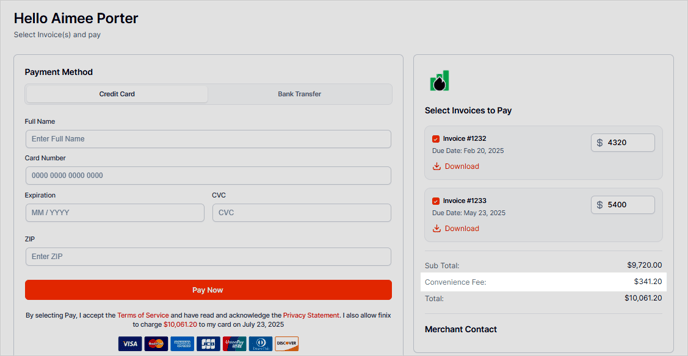
Adjust global convenience fee settings:
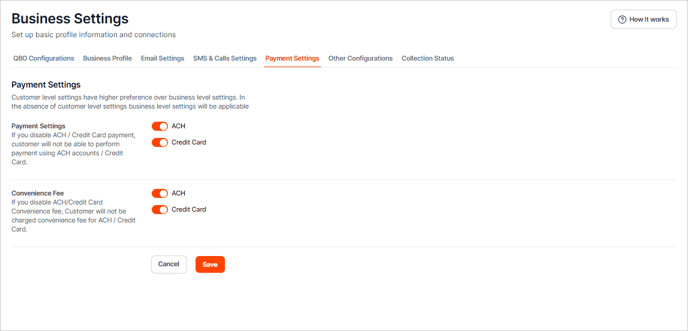
To turn on Credit Card or ACH convenience fees universally for every customer:
- Access your Account settings (three-dots icon beside your account name) and choose Business Settings.
- Navigate to the Payment Settings tab.
Adjust individual customer convenience fee settings:
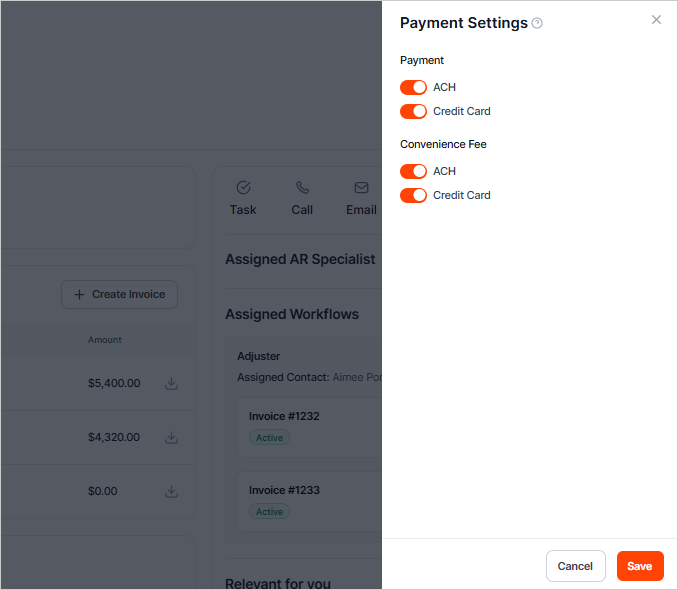
Here you can make individual changes to the customer's payment settings on a case-by-case basis.
- Go to the customer's page.
- Click the three-dots icon and choose Payment Settings.
- Choose to allow the customer to pay by ACH and/or Credit Card.
- Enable/disable the Convenience fee on a customer-by-customer basis from this section.