![cc5404e7b75e6d484a23b7d9f19a2774.png]](https://support.arworkflow.com/hs-fs/hubfs/cc5404e7b75e6d484a23b7d9f19a2774.png?height=50&name=cc5404e7b75e6d484a23b7d9f19a2774.png)
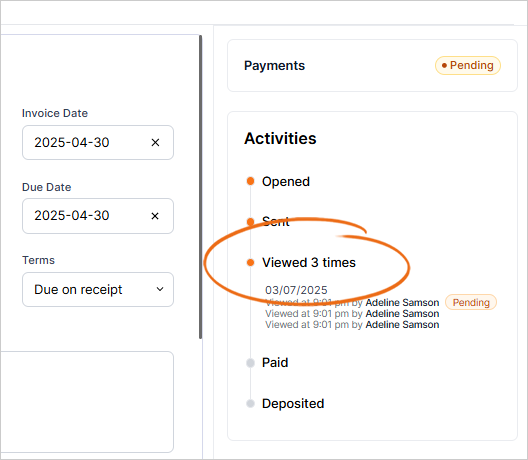
Have you ever wondered "is my customer even looking at the emails I am sending?" Well - wonder no more because AR Workflow keeps track of:
-
Who sent the invoice
-
When the invoice was sent
-
What email address the invoice was sent to
-
When the invoice payment link was viewed
-
When the invoice was paid

Steps to Track an Invoice
From the Invoice
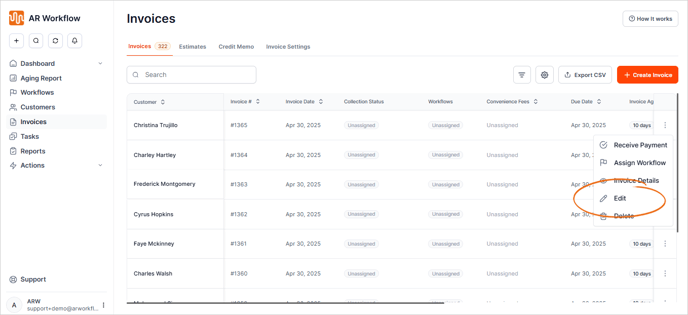
1. Go to the Invoices tab.
2. On the invoice you want to track, click the three dots icon and choose Edit.
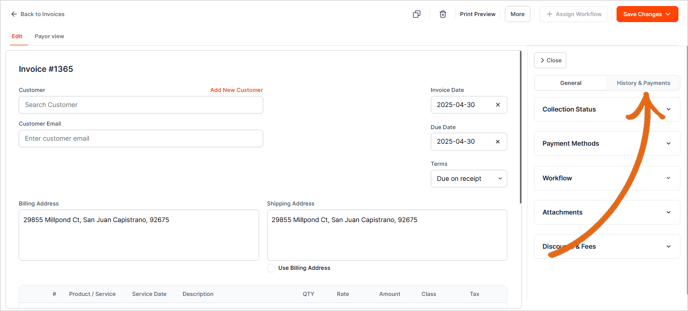
3. Click History & Payments.
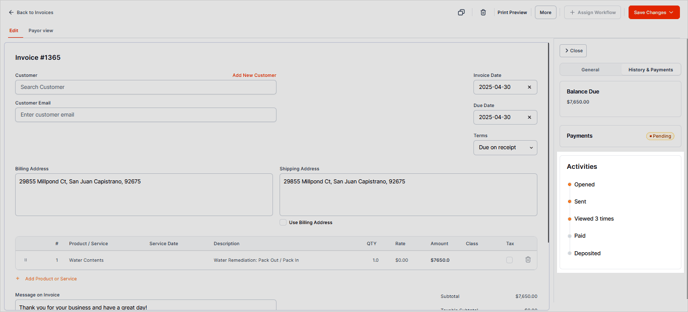
4. The tracking details will now appear under the Activities section.
From an Email
As long as the payment portal link is in the email, the invoice will be tracked. Send an email from the
-
Customer Detail Page
-
Workflow
-
+ Quick Action Drop-Down
-
Email Tab
And the invoice will track the status!
View Tracking Details
It's simple! Simply click on the invoice and scroll down to the bottom of the invoice page to view the tracking.
Emails and Invoices sent prior to this feature release (March 2023), may not show tracking. To start tracking, send the customer an email with the payment link included in the body.