![cc5404e7b75e6d484a23b7d9f19a2774.png]](https://support.arworkflow.com/hs-fs/hubfs/cc5404e7b75e6d484a23b7d9f19a2774.png?height=50&name=cc5404e7b75e6d484a23b7d9f19a2774.png)
All SMS messages created from AR Workflow are saved in the SMS tab.

Here you can view the following SMS messages:
-
Inbox
-
Sent
-
Archived

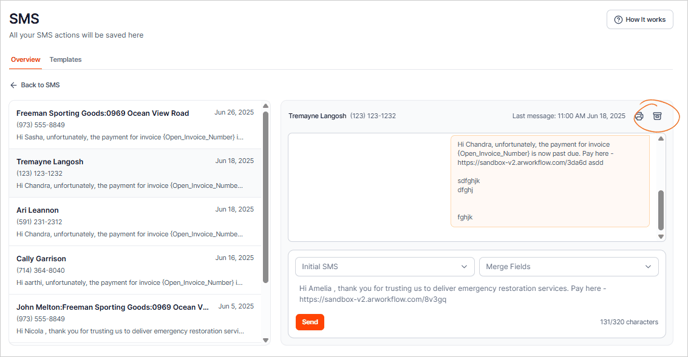
If you want to view the entire SMS thread, click on an SMS message from the list.

To reply, type your message in the message box.

You can also choose from the different options available in the Merge Fields to customize your message.

If you want to use one of your SMS Templates, click the SMS Templates drop-down and select a template from the list.
Once you pick a template, it will automatically fill the body of your SMS.

Review the details of your SMS message, and if you are happy with the result, click the Send button.

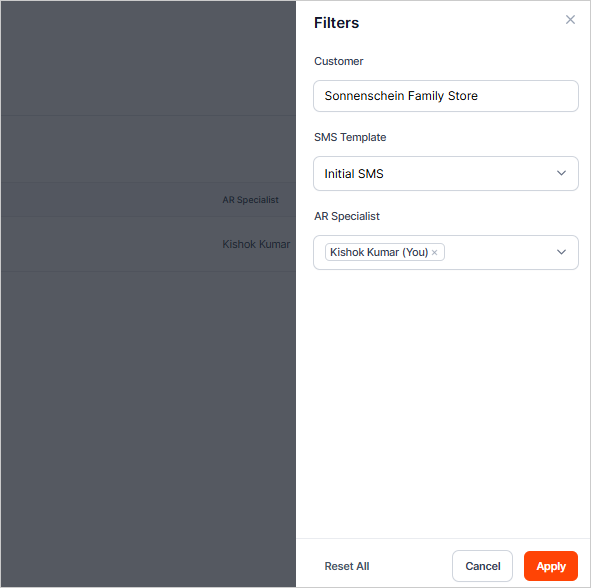
You also have the option to filter your SMS messages using the Filters button.
To archive an SMS message, click the Archive icon on the SMS you want to archive.

You also have the option to archive messages when the thread is open.