![cc5404e7b75e6d484a23b7d9f19a2774.png]](https://support.arworkflow.com/hs-fs/hubfs/cc5404e7b75e6d484a23b7d9f19a2774.png?height=50&name=cc5404e7b75e6d484a23b7d9f19a2774.png)
After syncing QuickBooks, the first step to ensure success with AR Workflow is to make sure each customer has the following information:
-
Email
-
Phone/Mobile Number
-
Billing Address
-
Claim Number (Customer ID) - If needed
-
Billing Contact - If needed
Steps to View Customer Details
Navigate to the Customer Tab and select the gear icon to open the page settings.

Remove any columns that don't pertain to this project, by unchecking them and click the "Save" button to save your changes.

Click a customer from the list to open the customer details.

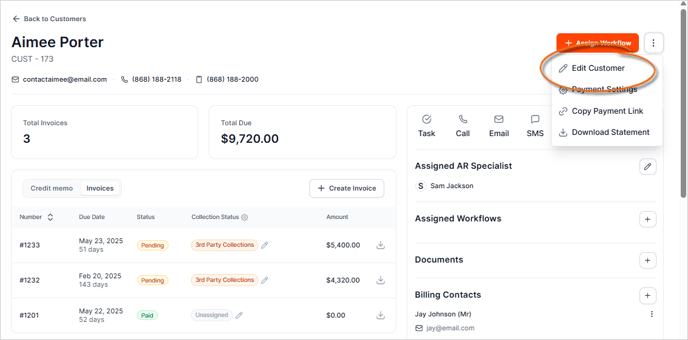
Click the three-dots icon and select Edit Customer.
Ensure the below fields are filled in. If any changes are made, press the Save Changes to apply your changes.
-
First and Last Name
-
Email
-
Mobile (for SMS)
-
Claim Number (If needed)
-
Billing Address
-
Billing Contact (if needed)
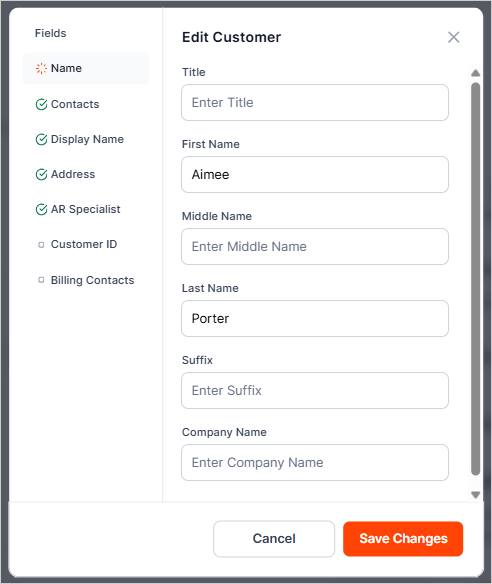
All edits here, with the exception of the claim number and billing contact, will sync over to QuickBooks.