![cc5404e7b75e6d484a23b7d9f19a2774.png]](https://support.arworkflow.com/hs-fs/hubfs/cc5404e7b75e6d484a23b7d9f19a2774.png?height=50&name=cc5404e7b75e6d484a23b7d9f19a2774.png)
AR Workflow separates Credit Memo and Cash Payments to make payment activity easier to review and understand. By clearly distinguishing between these payment types, you can more easily see how an invoice was settled, whether funds were received from the customer, or whether a credit was applied to the balance.
Payment Display
Credit memos reduce an invoice balance but do not represent money collected. AR Workflow therefore distinguishes credit memo transactions from cash payments, providing a clearer view of how invoice balances are resolved and how much cash has actually been received.
Cash Collected
Represents actual funds received through payment methods such as:
- ACH
- Credit Card
- Check
- Other cash-equivalent payment methods
Credit Memo Applied
Represents invoice balances reduced through customer credits, including:
- Product returns
- Service adjustments
- Discounts
- Other credit memo transactions
This separation provides a more accurate view of your actual cash collections.
Where to Find Payment Information
Credit Memo and Cash Payment information is available across several areas of AR Workflow.
Dashboard
The following widgets calculate cash collection metrics without including Credit Memo Payments:
- Payments Collected
- Workflow Result
Sales & Payments
Payment totals show actual cash collected, while Credit Memo Payments are displayed separately.
Invoice
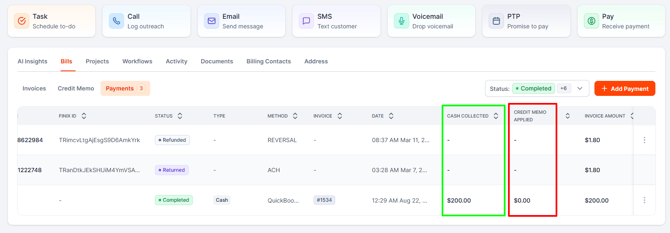
On the Invoice tab, where you’ll find a summary of your invoices, there’s also a Credit Memo subtab where you can clearly distinguish between the following payment types:
- Cash Collected
- Credit Memo Applied
This makes it easier to understand how an invoice balance was resolved.
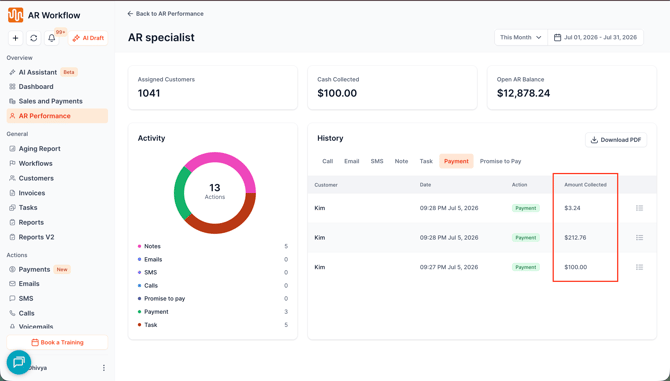
AR Performance
AR Performance metrics reflect actual cash recovery, with Credit Memo adjustments tracked separately
QBO Transaction List
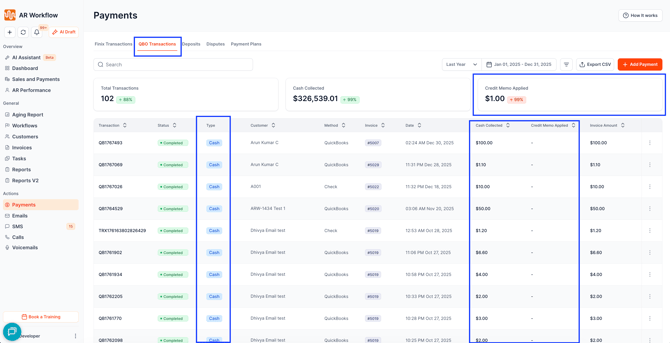
The QBO Transaction List provides additional visibility into payment activity.
Summary Cards
You’ll see separate totals for:
- Cash Collected
- Credit Memo Applied
Table Columns
The transaction list provides details on:
- Type (Cash, Credit Memo, or Both)
- Cash Collected
- Credit Memo Applied
Payment Type Filter
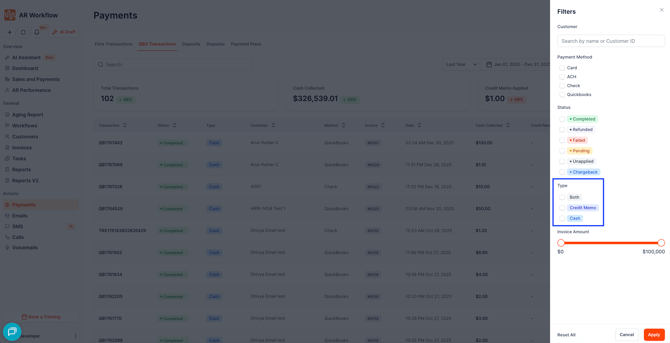
Quickly filter transactions by:
- Cash
- Credit Memo
- Both
Why This Matters
Separating Credit Memo Payments from Cash Payments provides a clearer and more accurate view of your collections and financial performance.
Benefits include:
- Clear visibility into actual cash received
- Easier bank reconciliation
- More accurate dashboards and reports
- More meaningful AR Performance metrics
- Better insight into collection effectiveness
- Greater transparency into how invoice balances are resolved
Rather than grouping all balance reductions together, you can clearly see how much was collected in cash and how much was resolved through customer credits.
Frequently Asked Questions
Why are Cash Payments and Credit Memo Payments shown separately?
This distinction provides a clearer view of your collections by separating actual cash received from invoice balances resolved through Credit Memos.
Will this affect my invoice balances?
No. Your invoice balances and payment history remain unchanged. The distinction only affects how payment information is displayed.
Where can I see the payment breakdown?
The separation is reflected across:
- Dashboard
- Sales & Payments
- Invoice Tab
- AR Performance
- Weekly Recap Email
- QBO Transaction List
What information is available in the QBO Transaction List?
The QBO Transaction List includes:
- Separate Cash Collected and Credit Memo Applied summary cards
- Type, Cash Collected, and Credit Memo Applied columns
- A Payment Type filter to view Cash, Credit Memo, or Both transaction types
Do I need to enable this feature?
No. This functionality is available automatically to all AR Workflow users.