![cc5404e7b75e6d484a23b7d9f19a2774.png]](https://support.arworkflow.com/hs-fs/hubfs/cc5404e7b75e6d484a23b7d9f19a2774.png?height=50&name=cc5404e7b75e6d484a23b7d9f19a2774.png)
Whether you're creating a new Email, SMS, or Voicemail, generating an SMS reply, or communicating across multiple channels, AR Workflow provides AI-assisted tools to help you create concise, personalized customer communications while keeping you in control of the final message.
The functionality includes:
- AI Draft for creating new Email, SMS, and Voicemail communications.
- AI-Assisted SMS Draft Generation for creating new SMS messages using selected communication parameters.
- AI-Assisted SMS Reply Generation for creating replies within existing SMS conversations.
- Unified Communication Composer for managing Email, SMS, Voicemail, and multi-channel communications.
- Contact Validation to ensure the required customer contact information is available before sending.
1. AI Draft for New Communications
AI Draft helps you create new customer communications from a single unified experience.
You can generate drafts for:
- SMS
- Voicemail
- Send via 3 Channels
Where to Find AI Draft
You can access AI Draft from:
AI Draft
Select AI Draft from the left navigation menu to open the unified communication composer.
AI Assistant → Priority Queue
AI Draft is also available through Recommended Actions on the Priority Queue for:
- Send Email
- Send SMS
- Send Voicemail
- Send via 3 Channels
Both entry points open the same communication composer.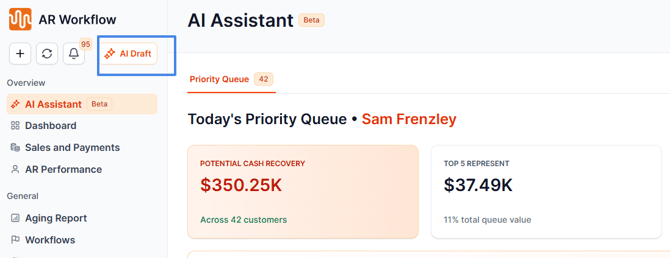
Creating a New AI Draft
- Open the AI Draft composer.
- Select the customer or billing contact.
- Review the suggested Intent, Tone, and Contact Type.
- Adjust the selections if needed.
- Select Draft with AI.
- Review the generated content.
- Edit or regenerate the draft if needed.
- Select Send when you're ready.
AI does not send messages automatically. You remain responsible for reviewing and sending the final communication.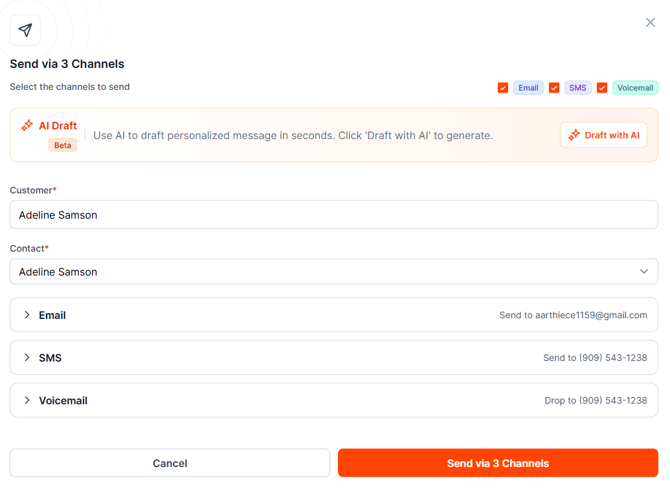
2. AI-Assisted SMS Draft Generation
AI-assisted SMS Draft Generation helps you create a new outbound SMS without having to write the message from scratch.
The draft is generated using the selected:
- Intent
- Tone
- Contact Type
The generated SMS is designed to be concise and relevant to the communication context.
You can:
- Generate an AI-assisted SMS draft.
- Change the selected Intent, Tone, or Contact Type.
- Regenerate the message if needed.
- Edit the generated SMS.
- Review the message before sending.
This is particularly useful when creating a new SMS communication and you need a concise message that reflects the purpose of the outreach.
SMS Character Limit
SMS messages are limited to 320 characters.
AI-generated content is created within this limit, and manually edited messages are also validated against the same limit.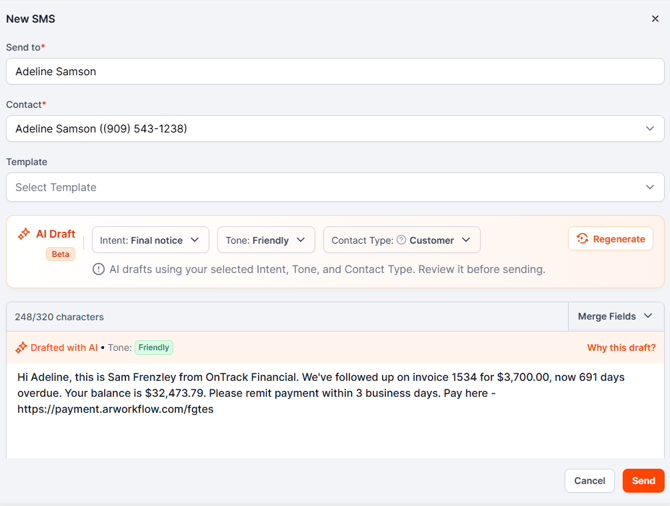
3. AI-Assisted SMS Reply Generation
AI-assisted SMS Reply Generation is designed for existing SMS conversations.
Instead of creating a new message from scratch, AI can use the conversation history and selected Tone to help generate a relevant reply.
You can:
- Open an existing SMS conversation.
- Select the AI-assisted reply option.
- Review the generated response.
- Regenerate the response if needed.
- Edit the reply.
- Send the reply once you're satisfied with the content.
The generated response considers the existing conversation context, helping maintain continuity between the customer's previous messages and your response.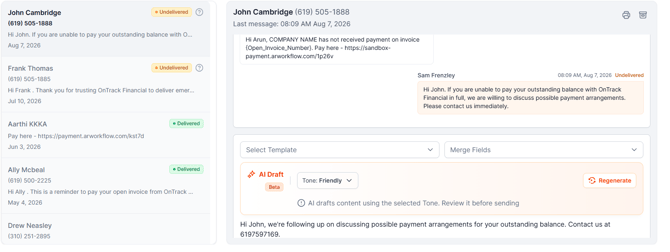
How SMS Drafting and Reply Generation Differ
AI SMS Draft Generation is used when creating a new outbound SMS and uses parameters such as Intent, Tone, and Contact Type.
AI SMS Reply Generation is used within an existing conversation and uses the conversation history and selected Tone to help generate an appropriate response.
4. Personalize and Control AI-Generated Content
AI-assisted communication is designed to support your workflow rather than replace your judgment.
Depending on the communication type, AI can use available information such as:
- Invoice aging
- Outstanding balances
- Invoice due dates
- Billing contact information
- Billing contact title
- Conversation history
For new communications, Intent, Tone, and Contact Type may be preselected based on available information. You can change these selections before generating or regenerating the content.
For existing SMS conversations, the reply is generated based on the conversation context and selected Tone.
Review and Regenerate
You can:
- Edit generated content.
- Regenerate an individual communication.
- Regenerate multiple selected channels.
- Review Why This Draft? where available.
Why This Draft? provides additional context about how an AI-generated draft was created.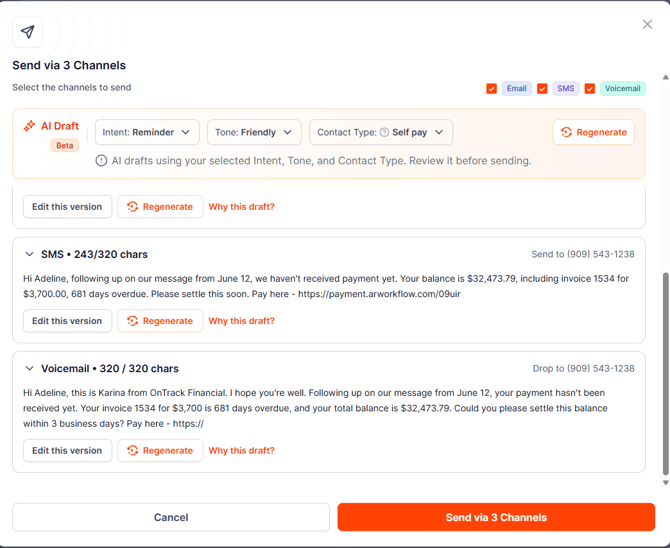
5. Contact Validation
AR Workflow validates customer contact information before communication actions are available.
The required information depends on the communication method:
- Email requires a valid email address.
- SMS requires a valid mobile number.
- Call and Voicemail require a valid phone or mobile number.
If the required information is unavailable, the relevant communication action is disabled and a warning explains why.
Select Review Contact Info to open the Edit Customer page and update the customer's information.
This helps prevent communication attempts from being sent when the required contact information is missing.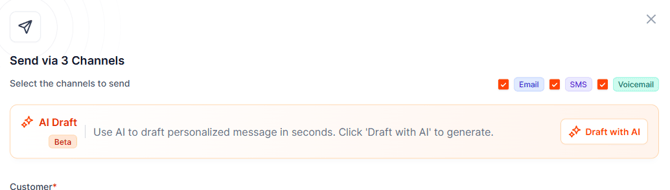
Frequently Asked Questions
What communication types are supported?
AI-assisted communication supports Email, SMS, and Voicemail, as well as multi-channel communication through Send via 3 Channels.
What is AI-Assisted SMS Draft Generation?
It helps you create a new outbound SMS using selected parameters such as Intent, Tone, and Contact Type.
What is AI-Assisted SMS Reply Generation?
It helps you create a reply to an existing SMS conversation using the conversation history and selected Tone.
What's the difference between an SMS draft and an SMS reply?
An SMS draft is used to create a new outbound message, while an SMS reply is generated within an existing conversation and considers the previous messages in that conversation.
Can I edit an AI-generated SMS?
Yes. You can edit the generated SMS before sending it.
Can I regenerate an SMS?
Yes. You can regenerate the message if the initial version does not meet your needs.
What is the SMS character limit?
SMS messages are limited to 320 characters, including manually edited content.
Does AI send messages automatically?
No. AI only generates the content. You must review and manually send the final message.
Can I change the Intent, Tone, or Contact Type?
Yes. For new AI Draft and SMS generation, you can adjust these settings before generating or regenerating the message.
What happens if the customer is missing contact information?
The relevant communication method is disabled and a warning explains what information is missing. You can select Review Contact Info to update the customer's details.
Why is AI Draft marked as Beta?
The Beta label indicates that the AI-assisted drafting experience continues to be refined based on customer feedback.