![cc5404e7b75e6d484a23b7d9f19a2774.png]](https://support.arworkflow.com/hs-fs/hubfs/cc5404e7b75e6d484a23b7d9f19a2774.png?height=50&name=cc5404e7b75e6d484a23b7d9f19a2774.png)
1. Navigate to the Customers tab.
2. Select the Billing Contacts tab.
3. Find the Billing Contact you'd like to investigate.
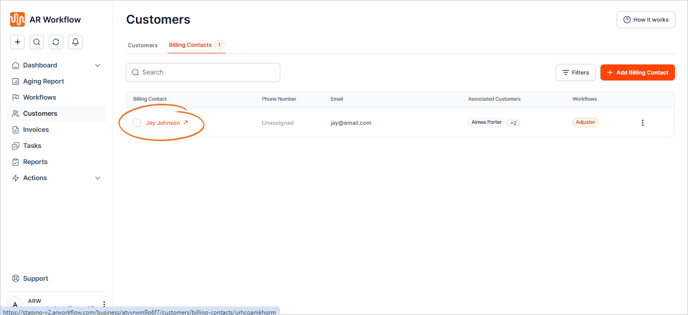
Once you click on the name of the Billing Contact, you will have access to view and manage:
-
Associated Customers.
-
Assigned Workflows.
-
Activity history of the Billing Contact (Calls, Emails, SMS, Notes, Tasks, Payments, and Voicemails).
