![cc5404e7b75e6d484a23b7d9f19a2774.png]](https://support.arworkflow.com/hs-fs/hubfs/cc5404e7b75e6d484a23b7d9f19a2774.png?height=50&name=cc5404e7b75e6d484a23b7d9f19a2774.png)
AR Workflow tracks when invoices are viewed by customers, giving your team a clearer picture of customer engagement at every stage of the collections process. Similar to QuickBooks invoice view history, this feature captures each view event — including how the invoice was accessed — so you always know whether your customer has seen what you sent.
Important — Data Availability
Invoice view tracking applies to invoices opened on or after May 26, 2026. Views prior to this date will not be available.
How Invoice View Tracking Works
An invoice is marked as Viewed in AR Workflow when one of the following occurs:
Email Open: When AR Workflow sends an invoice email, the system uses open tracking. Once the customer opens the email, the invoices attached to that email are automatically updated to Viewed.
Payment Link Access: When a customer opens the AR Workflow payment link, the invoice activity tracking status updates to Viewed. When accessed via a payment link, all invoices associated with that customer will be marked as viewed.
Where to See Invoice Views
Invoice view information is available in two places within AR Workflow:
1 — Inside the Invoice
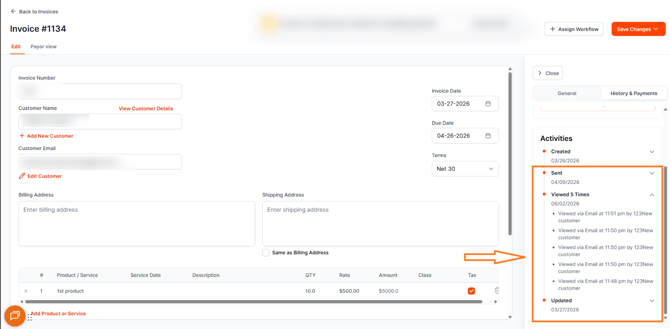
View events appear directly in the invoice timeline alongside existing Sent and payment-related activities. Each view event includes the exact date and time it occurred, as well as the source channel through which the invoice was accessed.
2 — On the Aging Report
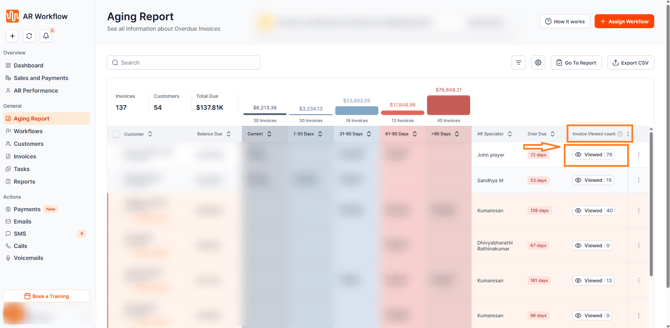
The Viewed status is also visible directly on the Aging Report, giving your team at-a-glance visibility into which invoices have been seen by customers — without needing to open each invoice individually. This makes it easy to prioritize follow-up based on customer engagement.
Invoice View Sources
AR Workflow identifies how an invoice was accessed and classifies each view accordingly:
-
Viewed via Email: The customer opened the invoice email sent through AR Workflow.
-
Viewed via SMS: The customer accessed the payment link delivered via SMS.
-
Viewed via Voicemail: The customer accessed the payment link delivered via voicemail.
-
Viewed via Direct: The customer accessed the link directly, including existing payment links and manually shared links. All views from untracked sources are automatically classified as Direct.
Backward Compatibility
All existing payment links continue to work without any changes. Views from existing or manually shared links are automatically classified as Direct — no action is required on your end.
Important — What Gets Marked as Viewed
When a customer opens an invoice email, only the invoices attached to that specific email will be marked as viewed. When a customer opens the payment link, all invoices associated with that customer will be marked as viewed.
Why This Matters
Invoice view tracking removes one of the most common unknowns in the collections process — whether the customer has actually seen the invoice. With visibility in both the invoice timeline and the Aging Report, your team can make more informed follow-up decisions, prioritize outreach more effectively, and have more meaningful conversations with customers about outstanding balances.
Need Help?
If you have questions about invoice view tracking or need help interpreting your invoice timeline, reach out to AR Workflow Support at support@arworkflow.com.