![cc5404e7b75e6d484a23b7d9f19a2774.png]](https://support.arworkflow.com/hs-fs/hubfs/cc5404e7b75e6d484a23b7d9f19a2774.png?height=50&name=cc5404e7b75e6d484a23b7d9f19a2774.png)
What Are Workflows?
A workflow is an automated sequence of actions that follows a predefined schedule to communicate with customers regarding unpaid invoices.
Instead of manually tracking invoices and remembering when to follow up, AR Workflow performs these actions automatically based on the workflow assigned to the invoice.
Workflows help businesses:
- Reduce manual collections
- Increase on-time payments
- Improve cash flow
- Reduce Days Sales Outstanding (DSO)
- Standardize customer communication
- Ensure no invoices are forgotten
What Can Workflows Do?
A workflow can automate a variety of collection activities, including:
- Email reminders
- SMS reminders
- Voicemail drops (if configured)
- Internal Action Notes
- Manual follow-up tasks
- Payment reminders
- Customer communication throughout the collections process
Everything runs automatically according to the schedule you configure.
How Workflows Work
Every workflow consists of three main components:
1. TriggerA trigger determines when the workflow begins.
Examples include:
- Invoice creation
- Invoice becoming overdue
- Workflow assignment
Actions are the automated activities the workflow performs.
These include:
- Sending an Email
- Sending an SMS
- Leaving a Voicemail
- Creating an Action Note
- Creating a manual follow-up task
Each action occurs on a specific day that you define.
Example: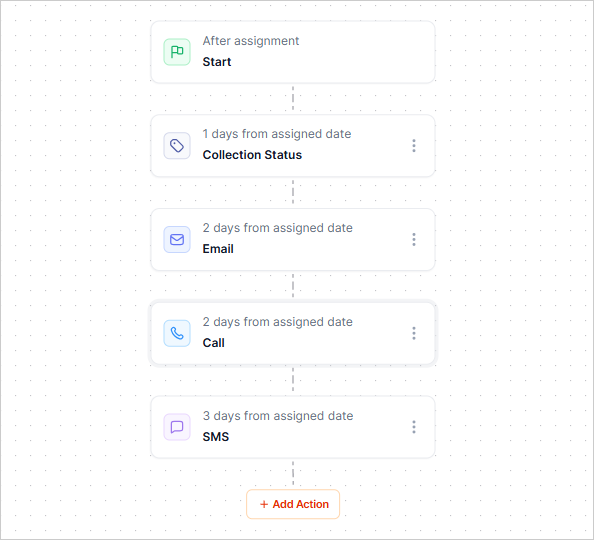
The timeline is completely customizable.
Customizing Reminder Schedules
AR Workflow allows you to fully customize your collections strategy.
You can choose:
- When reminders begin
- How many days between reminders
- Which communication methods to use
- When Action Notes appear
- When manual tasks are created
- The order of communications
Example:
- Day 1 – Email
- Day 5 – SMS
- Day 10 – Email
- Day 15 – Phone Call Task
- Day 20 – Final Reminder
This flexibility allows every business to match its own collections process.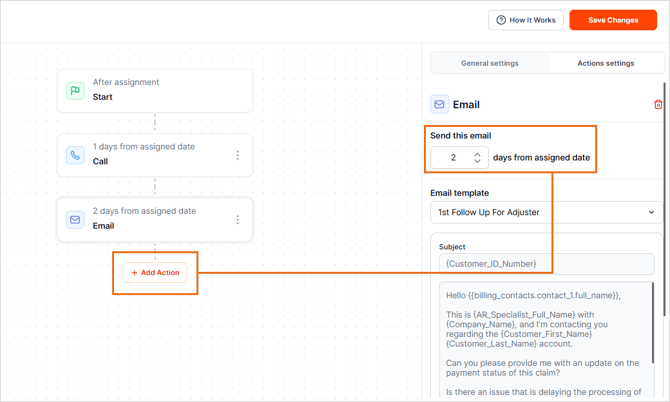
Multiple Workflows
Businesses are not limited to one workflow.
Many organizations create different workflows for different customer groups.
Examples include:
- Insurance Customers
- Homeowners
- Commercial Customers
- Self-Pay Customers
- VIP Customers
- Collections Workflow
- Friendly Reminder Workflow
Each workflow can have its own messaging style and reminder schedule.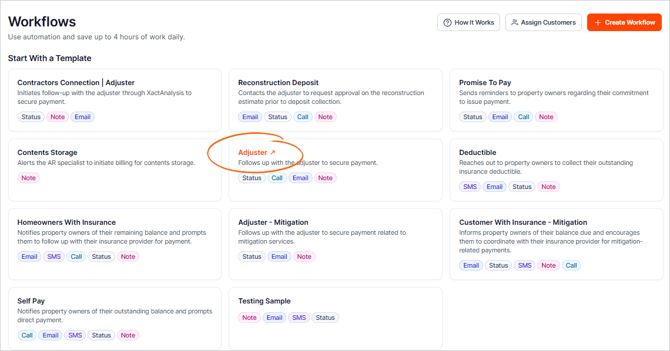
Assigning Workflows
For automation to occur, an invoice must be assigned to a workflow.
Once assigned:
- The workflow starts automatically.
- Emails and SMS messages are sent according to schedule.
- Internal tasks are created when applicable.
- Customer communication continues until the workflow ends.
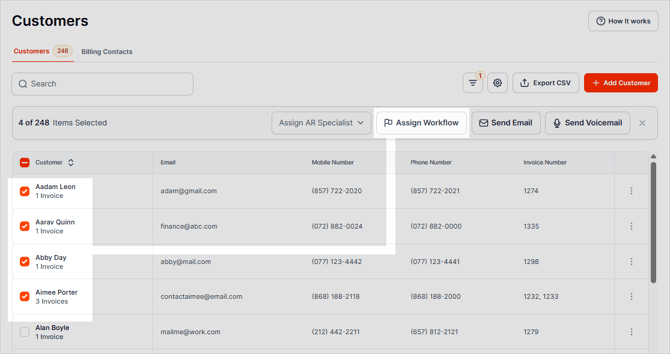
Automatic Workflow Completion
One of the biggest benefits of AR Workflow is that workflows automatically stop once an invoice has been paid in full.
When the invoice balance reaches $0.00, the workflow automatically ends, and no further:
- Emails
- SMS reminders
- Voicemails
- Action Notes
- Follow-up Tasks
will be generated for that invoice.
Important Notes
- The invoice must be paid in full.
- Partial payments do not stop a workflow.
- If a remaining balance exists, the workflow continues according to its configured schedule.
- Pending payments or unapplied credits may also prevent the workflow from stopping until the invoice balance reaches $0.00.
Action Notes & Manual Tasks
Workflows can automatically create reminders for your internal team.
Examples include:
- Call customer
- Review disputed invoice
- Escalate account
- Follow up on payment promise
- Review overdue balance
These tasks automatically appear on the assigned AR Specialist's dashboard.
Benefits of Using Workflows
Workflows help businesses:
- Automate collections
- Maintain consistent communication
- Reduce overdue balances
- Increase payment rates
- Improve cash flow
- Reduce manual work
- Keep AR Specialists organized
- Standardize collection processes
Best Practices
For the best results:
- Assign every invoice to a workflow.
- Create separate workflows for different customer types.
- Customize reminder timing to fit your business.
- Use a dedicated AR email address for workflow communications.
- Test email and SMS templates before activation.
- Periodically review workflow performance and adjust reminder timing when needed.
Frequently Asked Questions
Can I customize when reminders are sent?
Yes.
You can fully customize the number of days between reminders, the communication methods used, and the overall workflow schedule.
Can I create multiple workflows?Yes.
Many businesses create separate workflows for insurance customers, homeowners, commercial customers, self-pay accounts, and other collection scenarios.
Can workflows create internal tasks?Yes.
Workflows can automatically generate Action Notes and manual follow-up tasks for AR Specialists.
Do invoices need to be assigned to a workflow?Yes.
Invoices must be assigned to a workflow for automation to occur.
Will a partial payment stop the workflow?No.
Only invoices that have been paid in full (balance of $0.00) will automatically stop the workflow.
If there is any remaining balance, reminders and tasks will continue according to the configured workflow schedule.
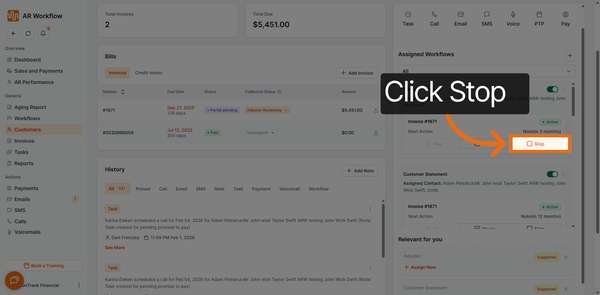
Can I pause a workflow?Yes.
If needed, workflows can be paused to temporarily stop automated communications. While paused, no reminders or tasks will be generated until the workflow is resumed.
Does AR Workflow provide legal collection templates?No.
AR Workflow does not provide templates for legal notices, litigation, or small claims court communications.
If legal communication is required, we recommend:
- Consulting your legal counsel for appropriate wording.
- Using AR Workflow's custom email functionality if you wish to send your own legally approved communication.
- Using reports such as the Aging Report to identify overdue accounts.
Summary
Workflows are designed to automate your collections process while giving you complete control over how and when customers are contacted.
By assigning invoices to workflows, customizing reminder schedules, and allowing automation to handle repetitive follow-up tasks, businesses can improve collections, reduce manual effort, and create a more consistent customer experience.
Once an invoice is paid in full, AR Workflow automatically stops the workflow, ensuring customers no longer receive unnecessary reminders.