![cc5404e7b75e6d484a23b7d9f19a2774.png]](https://support.arworkflow.com/hs-fs/hubfs/cc5404e7b75e6d484a23b7d9f19a2774.png?height=50&name=cc5404e7b75e6d484a23b7d9f19a2774.png)
Delete invoice statuses that you aren't using to reduce the amount of clutter when assigning a status to an invoice.
Heads up! Once you delete a status, it cannot be undone.
To delete an Invoice Status, follow these steps:
1. Go to the Customers tab.
Access to the Workflow tab is limited to Owner, Admin and AR Manager user profiles.

2. Pull up a customer from the list.

3. Click the Cog Wheel icon beside Collection Status.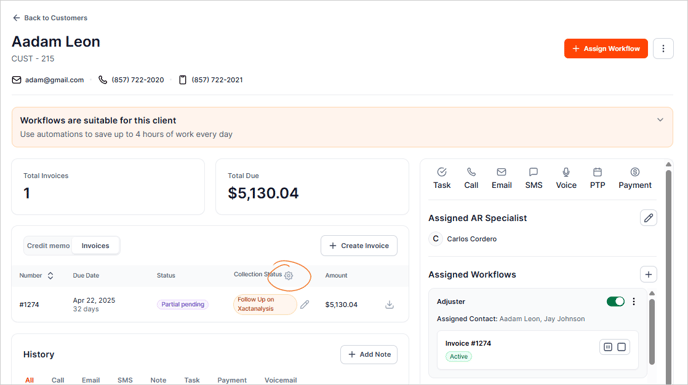
4. Delete the unused Invoice Collection Status. A grayed-out Delete icon means that the status is already assigned to a customer. To find which customers have this status assigned, filter the aging report.

5. Click the Delete button to confirm your action.

Check out our articles on: