![cc5404e7b75e6d484a23b7d9f19a2774.png]](https://support.arworkflow.com/hs-fs/hubfs/cc5404e7b75e6d484a23b7d9f19a2774.png?height=50&name=cc5404e7b75e6d484a23b7d9f19a2774.png)
Before you can send emails from AR Workflow, you must first set up your business email address.
Pro Tip: We recommend using an email address exclusively used by your Accounts Receivable department.
This information can only be edited by Owner and Admin user levels.
1. Click the three-dots icon beside your company name and choose Business Settings.
2. Go to the Email Settings tab.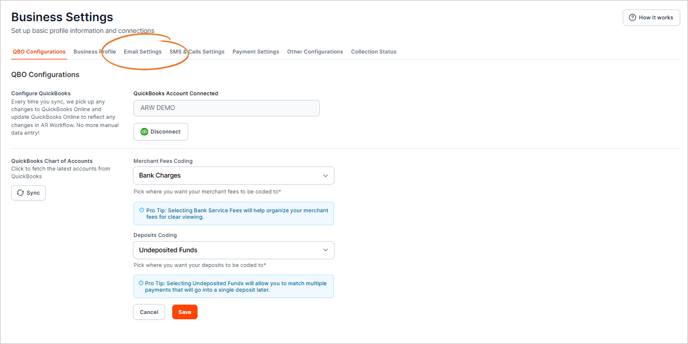
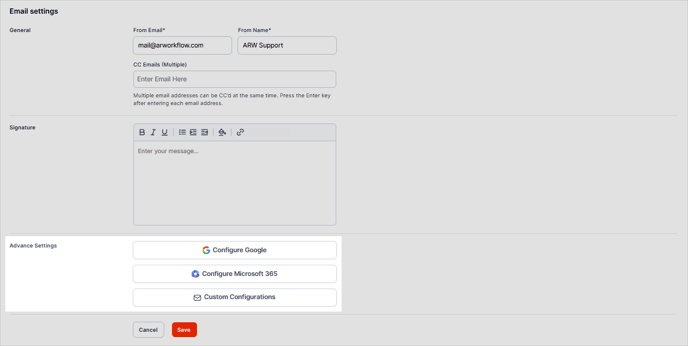
3. Type the details of your From Email and the Name that will be used when sending emails. Example:
-
mail@arworkflow.com
-
ARW Support

4. If you have an email address you wish to carbon copy on all sent emails, enter it in the CC Emails field.

5. For advanced email configuration, please consult your webmaster or systems administrator. They can guide you through the necessary steps and ensure that the settings are properly implemented for optimal performance and security.