![cc5404e7b75e6d484a23b7d9f19a2774.png]](https://support.arworkflow.com/hs-fs/hubfs/cc5404e7b75e6d484a23b7d9f19a2774.png?height=50&name=cc5404e7b75e6d484a23b7d9f19a2774.png)
Duplicating Email Templates saves you time and allows you to create a new template by editing existing text rather than starting from scratch. Do you need a similar template for adjusters, insurance, and self-pay, but with minor edits to the text for each? Use the duplicate feature to create several versions of the same email.
Access to the Workflow tab is limited to Owner, Admin and AR Manager user profiles.
1. Navigate Actions and choose Emails.

2. Go to Templates.
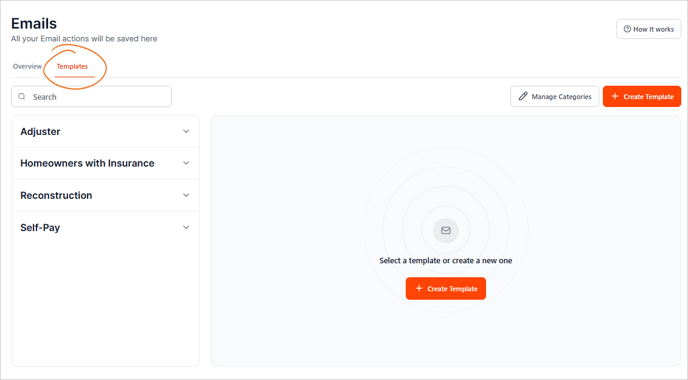
3. Choose the template that you want to duplicate.

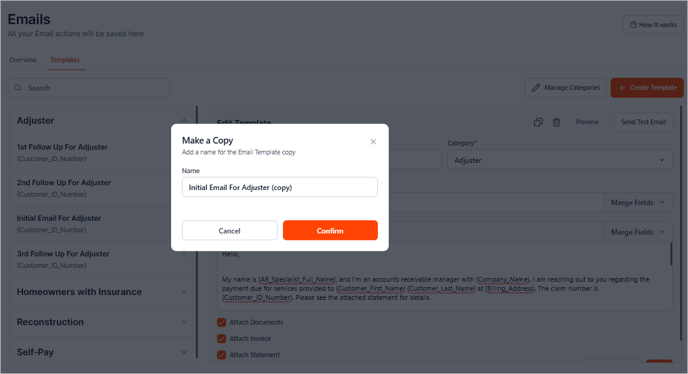
4. Click the three dots icon and choose Make a Copy.

5. Rename the duplicated template. The duplicated email will be renamed with the word "copy".
6. Click Confirm.
Now you can start making changes to this template without having to begin from scratch!