![cc5404e7b75e6d484a23b7d9f19a2774.png]](https://support.arworkflow.com/hs-fs/hubfs/cc5404e7b75e6d484a23b7d9f19a2774.png?height=50&name=cc5404e7b75e6d484a23b7d9f19a2774.png)
Access to the Workflow tab, where email templates are housed, is limited to Owner, Admin and AR Manager user profiles.
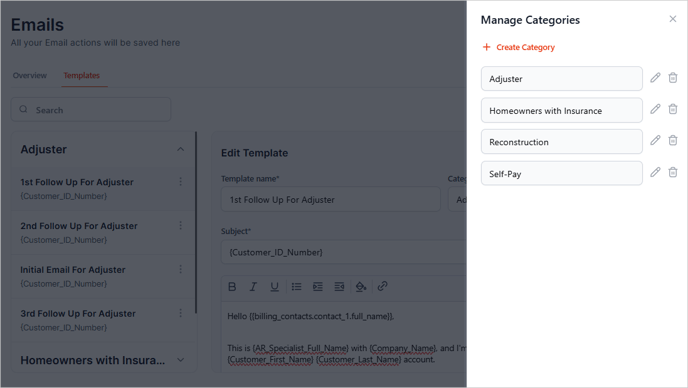
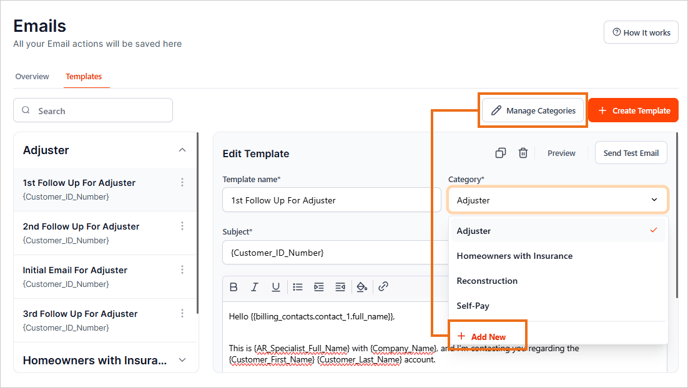
When it comes to categorizing your email templates, there are 2 choices:
-
Create a new category under the Manage Categories section.
-
Create a new category by clicking + Add New under the Category drop-down menu inside the Email Template editor.
Edit an existing category
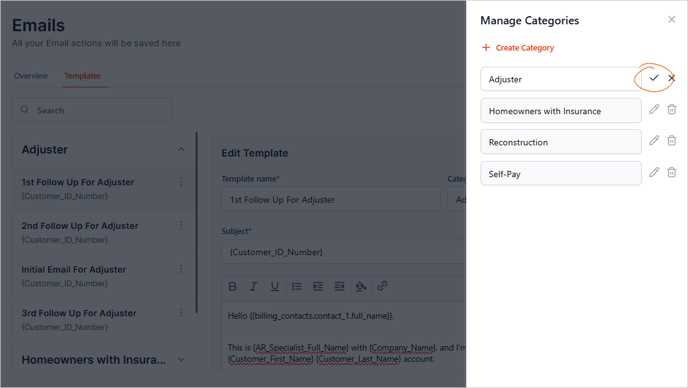
You can also update an entire Email Category by clicking the pencil icon next to the category name in the Manage Categories section. After making your changes, click the check icon to save them.
Note: Performing this action will also change the category of all the Email Templates inside the category.