![cc5404e7b75e6d484a23b7d9f19a2774.png]](https://support.arworkflow.com/hs-fs/hubfs/cc5404e7b75e6d484a23b7d9f19a2774.png?height=50&name=cc5404e7b75e6d484a23b7d9f19a2774.png)
We hate to see you go, but we understand that these things happen.
🚨 Important Reminder:
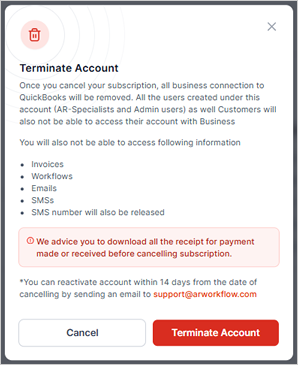
Once your subscription has been canceled:
-
All QuickBooks information will be removed.
-
Access to the software will be removed.
-
Any outstanding payment links sent to customers via email or SMS will no longer function.
Upon account termination, you will lose access to the following:
-
Invoices within AR Workflow
-
Access to Workflows
-
AR Workflow Emails
-
SMS conversations
-
Access to the virtual SMS number used to send/receive text messages
Steps to cancel your plan with AR Workflow
1. Click the three-dots icon and choose Account & Billing.

2. Click the Terminate Account button.

3. Click Terminate Account to proceed.
Note: We advise you to download all the receipts for payments made or received before deleting your account. You can reactivate your account within 14 days from the date of termination by sending an email to support@arworkflow.com