![cc5404e7b75e6d484a23b7d9f19a2774.png]](https://support.arworkflow.com/hs-fs/hubfs/cc5404e7b75e6d484a23b7d9f19a2774.png?height=50&name=cc5404e7b75e6d484a23b7d9f19a2774.png)
What is Automatic SMS Fallback
SMS messages are sent to a customer's Phone Number when a Mobile Number is not available. This automatic fallback reduces the need to manually copy a customer's Phone Number into the Mobile Number field before sending an SMS or assigning a workflow.
How SMS Fallback Works
Instead of sending SMS only to the phone number entered on the Mobile Number field, AR Workflow will check both Phone and Mobile number while sending an SMS. If a customer had a Phone Number but no Mobile Number, users needed to manually add or copy the Phone Number into the Mobile Number field before an SMS could be sent.
With the automatic fallback, the system determines which number to use based on the customer's contact information:
- If a Mobile Number is available, it is used as the primary SMS destination.
- If a Mobile Number is not available, the customer's Phone Number is used as the fallback SMS destination.
- If neither number is available, there is no number available for SMS delivery.
This is especially useful for customers imported from systems such as QuickBooks, where customer records may contain a Phone Number but no Mobile Number.
Identifying the SMS Destination
The SMS Composer now displays an indicator next to the number to show which type of number will receive the message:
- (M) — The SMS will be sent to the customer's Mobile Number.
- (P) — The SMS will be sent to the customer's Phone Number using the fallback logic.
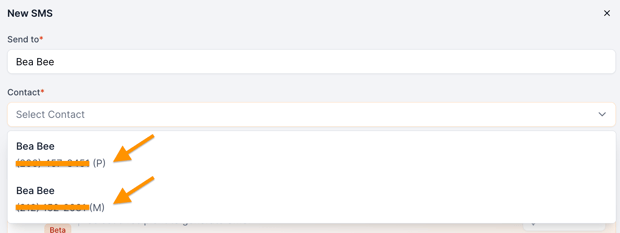
For example, if a customer has only a Phone Number, the SMS Composer will display (P) next to the number. Once a Mobile Number is added to the customer's profile, the indicator changes to (M) because the Mobile Number becomes the primary SMS destination.
Mobile Number Takes Priority
When both a Mobile Number and Phone Number are available, the system always uses the Mobile Number for SMS.
For example:
Customer Information |
SMS Destination |
|
Mobile Number only |
Mobile Number (M) |
|
Phone Number only |
Phone Number (P) |
|
Both Mobile and Phone Number |
Mobile Number (M) |
|
Neither number available |
SMS cannot be sent |
Example
A customer imported from QuickBooks has:
- Phone Number: 555-0100
- Mobile Number: Not available
When you compose an SMS for this customer, the destination will be shown with (P), indicating that the Phone Number will be used as the fallback.
If you later add a Mobile Number to the customer's profile, the SMS destination will change to (M), and future SMS messages will be sent to the Mobile Number instead.
Important: The Phone Number Must Support SMS
Using a Phone Number as a fallback does not guarantee that the message will be delivered.
The number must be capable of receiving SMS messages. For example, if the fallback number is a landline, the SMS may be sent but ultimately appear as Undelivered because the number cannot receive SMS.
Always verify that the customer's Phone Number is SMS-capable when relying on the fallback option.
Summary
The automatic SMS fallback makes it easier to communicate with customers whose profiles do not contain a Mobile Number.
Remember:
- Mobile Number (M) is always preferred and prioritized when available.
- Phone Number (P) is used as a fallback when no Mobile Number is available.
- The fallback number must be capable of receiving SMS.
- A landline or other non-SMS-capable number may result in an Undelivered message.
- No manual copying of the Phone Number into the Mobile Number field is required.