![cc5404e7b75e6d484a23b7d9f19a2774.png]](https://support.arworkflow.com/hs-fs/hubfs/cc5404e7b75e6d484a23b7d9f19a2774.png?height=50&name=cc5404e7b75e6d484a23b7d9f19a2774.png)
All archived emails are kept in the AR Workflow Emails tab and can be unarchived at any time.
To unarchive an email, hover your mouse over the email you want to process and click the Unarchive icon.
The email will go back to the inbox or sent folder.

If you happen to open the email preview, you can still unarchive the email.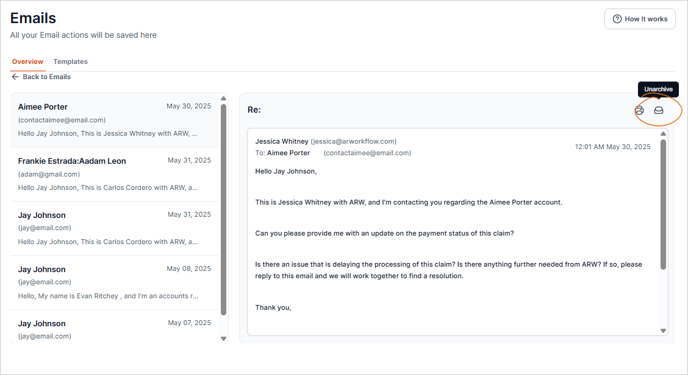
To filter the Archive list, click the Filters button.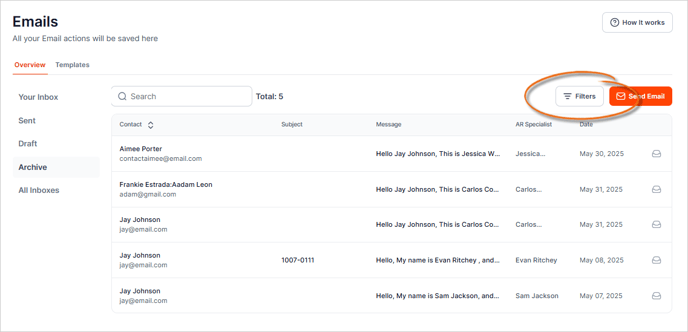
Then select the filters you want to apply. Once done, click the Apply button to filter the list.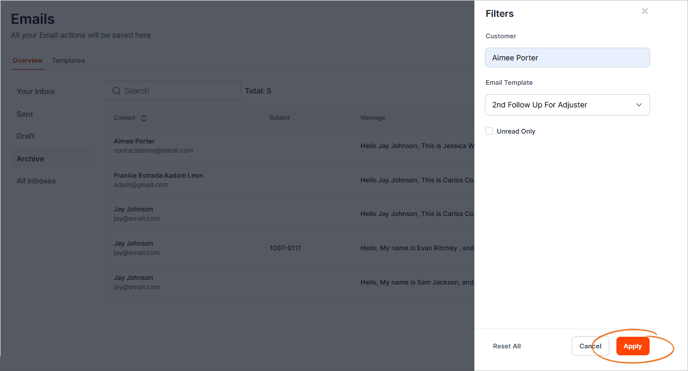
If you need to remove all filters applied, click the Reset All button.