![cc5404e7b75e6d484a23b7d9f19a2774.png]](https://support.arworkflow.com/hs-fs/hubfs/cc5404e7b75e6d484a23b7d9f19a2774.png?height=50&name=cc5404e7b75e6d484a23b7d9f19a2774.png)
AI Reply helps you respond to incoming customer emails faster, without sacrificing personalization or accuracy. When you receive an incoming email, simply click Draft with AI in the reply composer — AR Workflow analyzes the full email thread and generates a contextual reply using the customer's real account data.
Important: AI never sends anything automatically. You always review, edit, and send through the existing reply composer — exactly as you do today.
What AI Reply Helps You Do
Respond to incoming customer emails faster. Generate contextual, thread-aware replies using real customer data. Reduce manual effort in composing reply emails.
How to Use AI Reply
When you receive an incoming customer email, click Reply or Reply All on the email thread. The reply composer will open with the To field — and CC field for Reply All — pre-populated with the sender's details.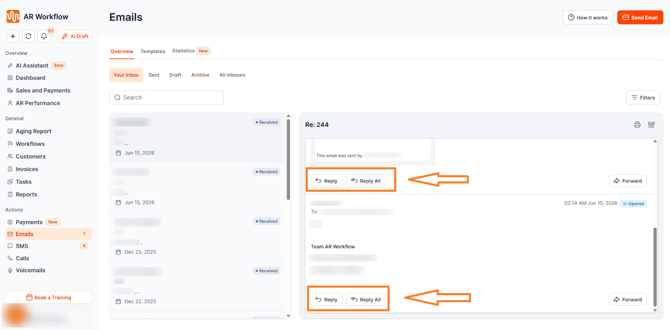
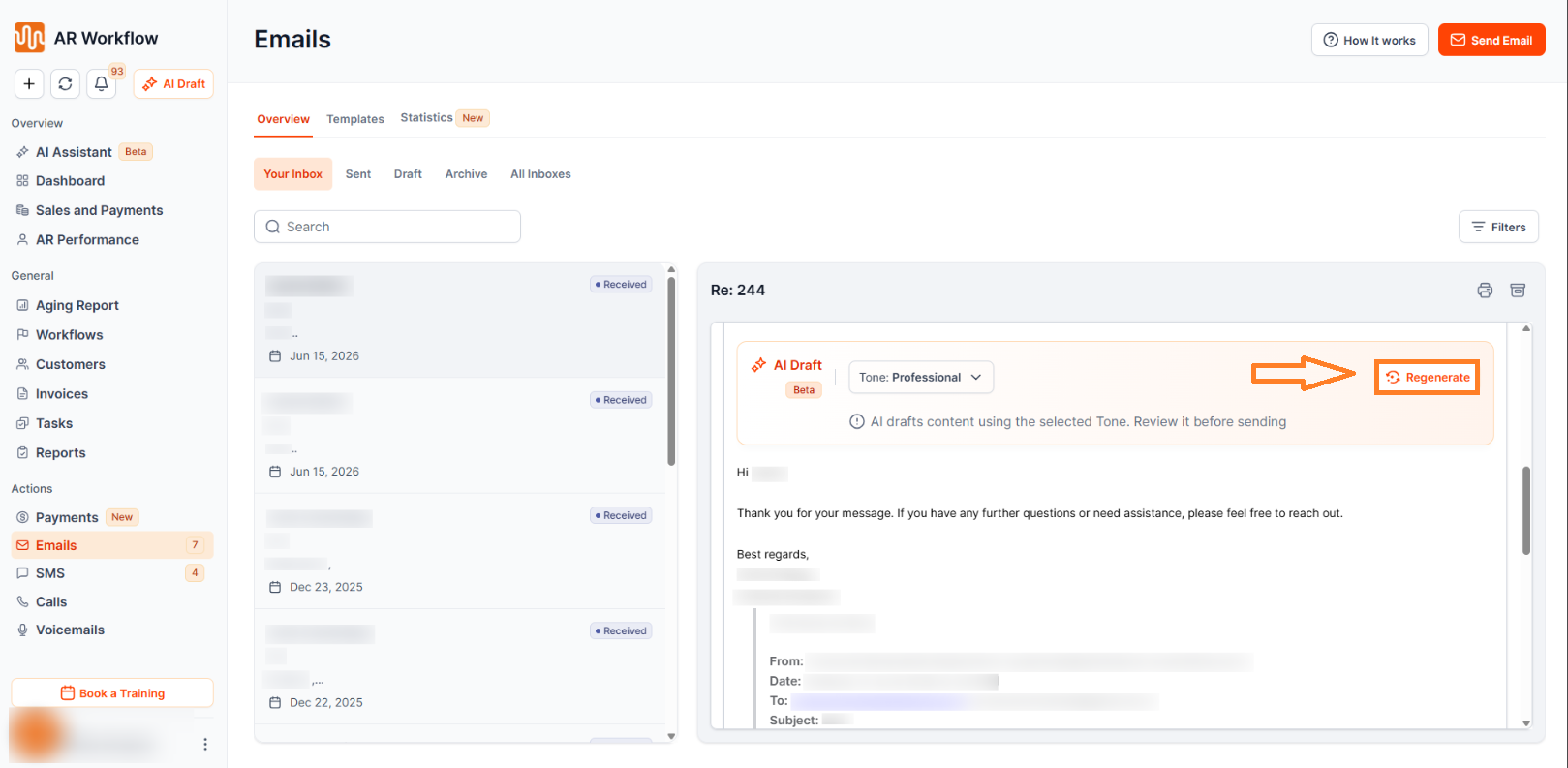
In the reply composer, you will see the AI Draft section. Select your preferred Tone, then click Draft with AI. AR Workflow will analyze the full incoming email thread and generate a contextual reply in the rich text editor.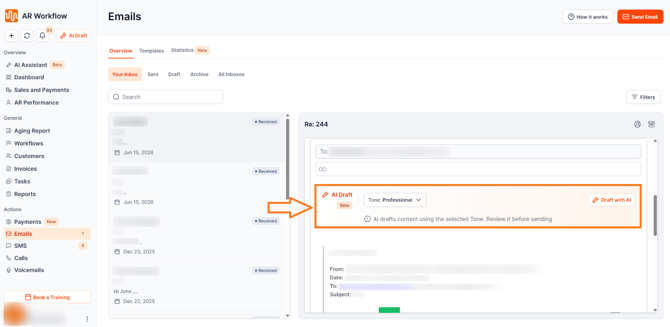
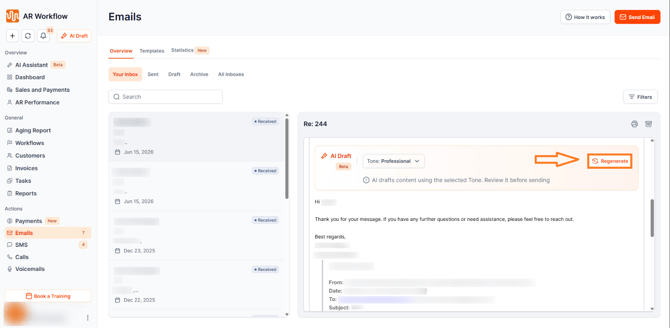
From there you can edit the draft, regenerate it with the same or a different tone, add attachments, or send it as-is.
Choosing the Tone
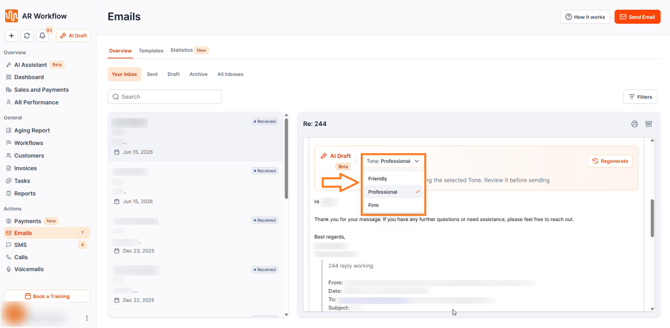
Tone controls how firm or warm the reply sounds. Professional is selected by default for all reply emails, but you can change it before generating:
-
Friendly — Warm, approachable language suited for customers who are engaged and responsive.
-
Professional — Business-appropriate, balanced tone. This is the default for all reply emails.
-
Firm — Direct, assertive language for situations that require a more serious approach.
If you regenerate after changing the tone, the new draft will use the updated selection.
What the AI Uses to Generate Your Reply
AI Reply generates a contextual response using two key sources of information:
The Incoming Email Thread
The AI reads the full thread before generating a reply — including the sender's name and email address, the subject line, the full email body and thread content, and the date and time of the incoming email. This ensures the reply always makes sense in context and directly addresses what the customer said.
Real Customer Account Data
-
Customer Details — First Name, Last Name, Company Name, Customer ID Number, Billing Address, Ship-To Address, and AR Specialist Name.
-
Invoice Details — Document Number, Due Amount, Due Date, Outstanding Balance, and Days Overdue.
-
Collection Details — Customer Collection Status and Invoice Collection Status.
-
Promise to Pay — Amount and Promise-to-Pay Date, if applicable.
-
Payment Plans — Installment Amount, if applicable.
-
Payment Links — Inserted automatically at send time using a secure token. The AI does not invent or generate URLs.
-
Email Engagement Data — Whether the customer previously opened an email or clicked a payment link, allowing the reply to be tailored based on prior engagement.
Regenerating and Editing Your Reply
If you click Regenerate, or change the Tone with text already in the composer, the system will always generate a new version based on the updated tone and the incoming email thread context.
If your reply contains embedded images, such as customer statement screenshots, those images are removed before the AI processes the text — only the wording is regenerated, and the images remain in the composer. The AI is also instructed not to add any new image tags to the regenerated reply.
You always have full control over the reply, including the ability to edit the generated body, remove any AI-generated content, add attachments, send the reply as-is without regenerating, or change the tone and regenerate.
What AI Reply Does Not Do
-
AI Reply does not auto-send replies — every draft must be reviewed and sent manually by you.
-
AI Reply does not bypass your review — every generated reply requires your explicit action before it is sent.
-
AI Reply does not generate SMS or voicemail replies — only email replies are supported.
-
AI Reply does not modify the incoming email — the original thread remains completely unchanged.
-
AI Reply does not invent URLs or payment links — all links use secure merge field tokens replaced at send time.
Security & Permissions
AI Reply fully respects all existing AR Workflow role permissions. There is no autonomous sending — the AI only drafts content, and you always remain the one who sends.
Need Help?
If you have questions about AI Reply or need help with a generated draft, reach out to AR Workflow Support at support@arworkflow.com.