![cc5404e7b75e6d484a23b7d9f19a2774.png]](https://support.arworkflow.com/hs-fs/hubfs/cc5404e7b75e6d484a23b7d9f19a2774.png?height=50&name=cc5404e7b75e6d484a23b7d9f19a2774.png)
The Aging Report in AR Workflow has been updated with two improvements that make it easier to identify workflow gaps and understand customer engagement with outstanding invoices.
Workflow Assignment Visibility
Identifying customers without an assigned workflow in the Aging Report is now faster and more actionable than ever.
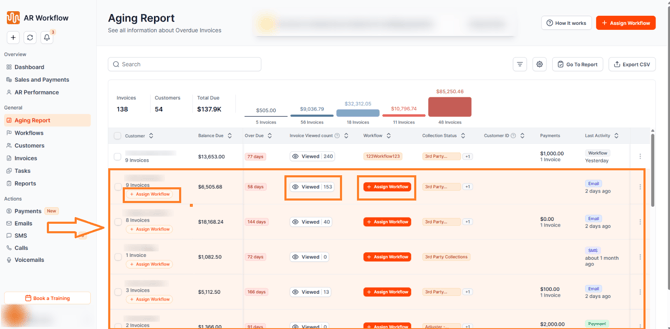
Customers whose open invoices have no assigned workflow are now highlighted with a light orange background in the Aging Report, making them immediately visible without needing to scan through each row manually.
The previous "Unassigned" label has been replaced with an actionable Assign Workflow button — available at both the customer row level and within the workflow column. Clicking the button opens the existing Assign Workflow modal, so the experience is familiar and no new steps are required.
Important: The Assign Workflow button at the customer row level appears only when all open invoices for that customer have no workflow assigned. If even one invoice already has a workflow, the button will be hidden at the customer row level — but will still be available at the individual invoice level within the workflow column.
Invoice Viewed Count on the Aging Report
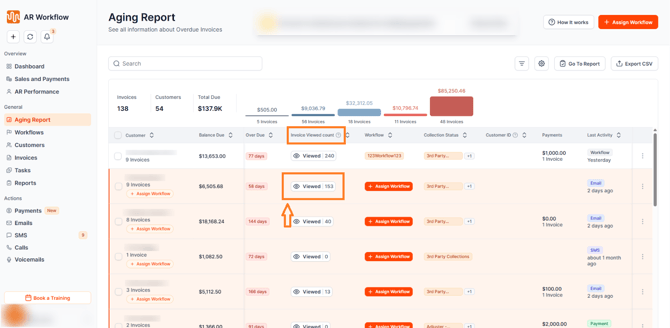
A new Invoice Viewed Count column is now available in the Aging Report, giving your team visibility into how many times a customer's invoices have been viewed.
The column is sortable, allowing your team to quickly surface customers with the highest view counts — making it easy to identify who has seen their invoice multiple times but has not yet paid.
The Invoice Viewed Count column is also included in CSV exports when selected.
Detailed View Insights
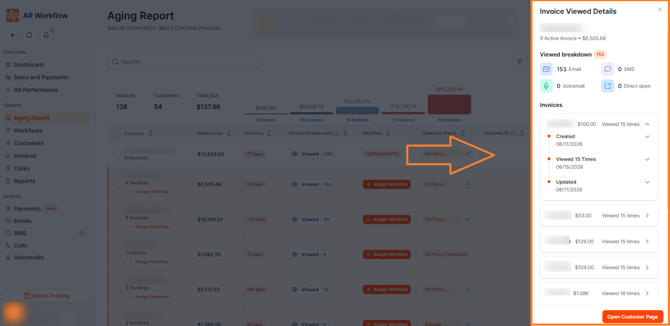
Clicking into a customer's Invoice Viewed Count reveals a detailed breakdown including the total view count for that customer, a source breakdown showing how the invoice was accessed — via Email, SMS, Voicemail, or Direct — and an invoice-level activity timeline showing each individual view event.
Why This Matters
A customer who has viewed their invoice multiple times but hasn't paid is one of the strongest signals for a targeted follow-up. Combined with the new workflow assignment visibility, your team now has everything needed to prioritize the right customers, close workflow coverage gaps, and drive more effective collections — all directly from the Aging Report.
Need Help?
If you have questions about the Aging Report updates or need help setting up the Invoice Viewed Count column, reach out to AR Workflow Support at support@arworkflow.com.